


Get Started: UiPath-ADPv1 Exam [2025] Dumps UiPath PDF Questions
UiPath-ADPv1 Premium Exam Engine pdf Download
NEW QUESTION # 111
What is the output type returned when using a Get Test Data Queue Item activity?
- A. Dictionary
- B. Object
- C. Queueltem
Answer: C
NEW QUESTION # 112
What method can be used to change the index of an existing column in a datatable?
- A. SetColumnlndex
- B. SetOrdinal
- C. Setlndex
- D. Move At
Answer: B
NEW QUESTION # 113
While working in an RPA testing project, you encountered the following activity in one of the workflows included in the project.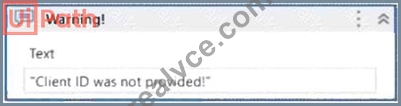
What action can you perform in your mocked file to replace the functionality of the MessageBox with a LogMessage during mock testing?
- A. Create mock workflow.
- B. Synchronize mock.
- C. Remove mock activity.
- D. Surround activity with mock.
Answer: D
Explanation:
To replace the functionality of the MessageBox with a LogMessage during mock testing, the developer can perform the action of Surround activity with mock. This action inserts a mock activity around the selected activity, which allows the developer to change the behavior of the activity for testing purposes. For example, the developer can right-click on the MessageBox activity and select Surround activity with mock from the dropdown menu. This will create a mock activity that contains the MessageBox activity. The developer can then edit the mock activity and replace the MessageBox activity with a LogMessage activity, which will write the message to the output panel instead of displaying it in a dialog box. This way, the developer can test the functionality of the workflow without having to interact with the MessageBox dialog box. References: [Mock Testing], [Surround Activity with Mock]
NEW QUESTION # 114
When creating a new test case, which option restricts dynamic data update in UiPath Orchestrator once the test case is published?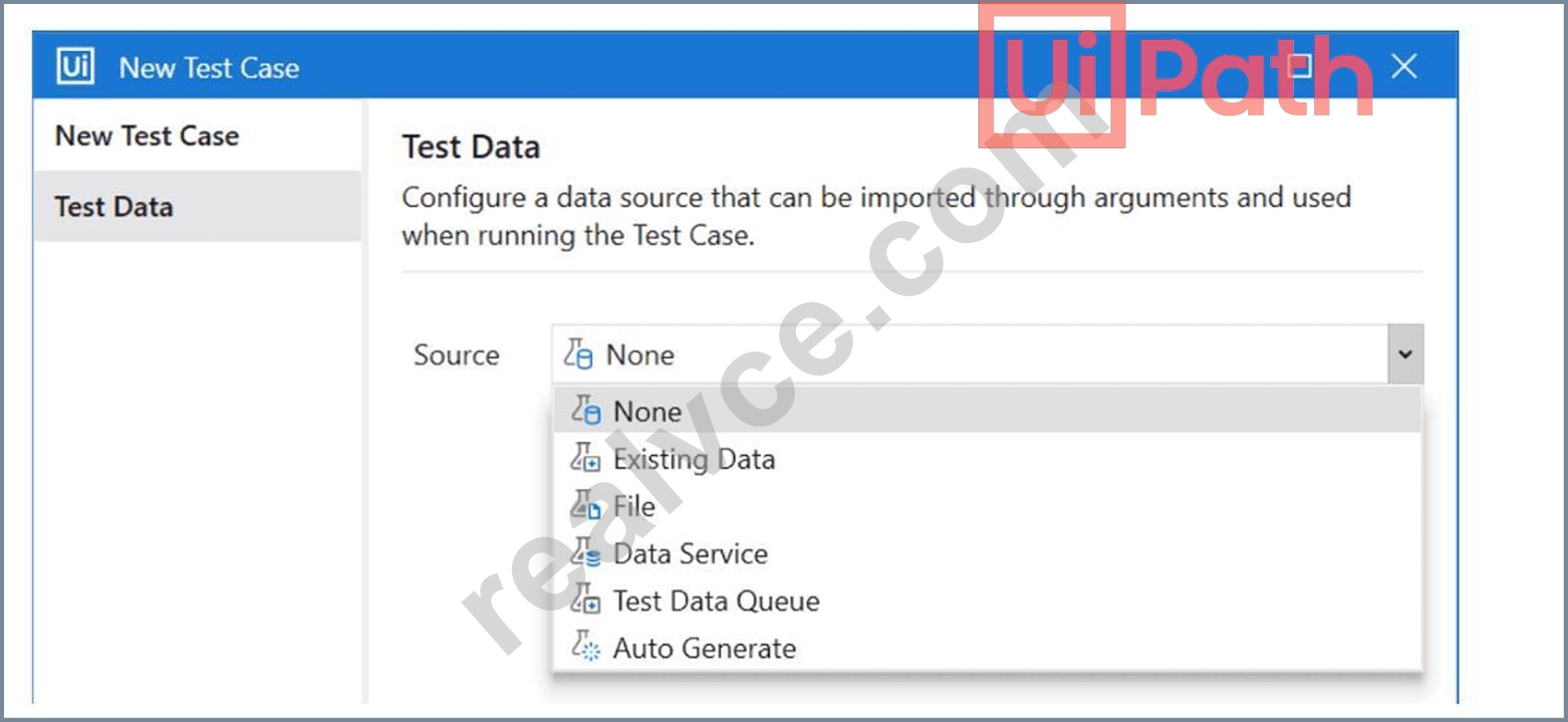
- A. Test Data Queue
- B. File
- C. Data Service with Filter
- D. Data Service
Answer: B
Explanation:
When creating a new test case in UiPath Studio, you can configure a data source that can be imported through arguments and used when running the test case. You can choose from different options for the data source, such as File, Data Service, Test Data Queue, and Auto Generate. Each option has different implications for how the test data is updated in UiPath Orchestrator once the test case is published.
The option that restricts dynamic data update in UiPath Orchestrator once the test case is published is File.
This option allows you to use Excel and CSV files as data sources for your test cases. When you import a file as a data source, a JSON file is created in the Test Data folder of your project, which contains the test data values. When you publish the test case, the JSON file is also published and stored in Orchestrator. The test data values are not updated dynamically in Orchestrator, unless you manuallyupdate the test data by choosing the Update Test Data option in Studio or Test Explorer. This option is useful when you want to use static or predefined test data that does not change frequently.
The other options do not restrict dynamic data update in UiPath Orchestrator once the test case is published.
Option A, Test Data Queue, allows you to use a queue in Orchestrator as a data source for your test cases.
You need to configure a JSON schema and add a test data queue in Orchestrator before using this option. The test data values are updated dynamically in Orchestrator, as the queue items are processed by the test case.
This option is useful when you want to use queue items as test data and track their status and progress. Option B, Data Service with Filter, allows you to use Data Service entities as data sources for your test cases. Data Service is a feature of Automation Cloud that lets you create and manage data entities and relationships. You need to select an entity and apply a filter using the Query Builder before using this option. The test data values are updated dynamically in Orchestrator, as the entity records are modified by the test case or other processes. This option is useful when you want to use data entities as test data and perform CRUD operations on them. Option D, Auto Generate, allows you to use test data that is automatically generated by UiPath Studio to cover as many paths as possible during execution. You need to select a test data generation strategy and a number of test data sets before using this option. The test data values are updated dynamically in Orchestrator, as the test case is executed with different data sets. This option is useful when you want to use random or diverse test data that can increase the test coverage and quality.
References: Studio - Data-Driven Testing - UiPath Documentation Portal, RPA Testing with Studio - UiPath Academy, Step-by-step illustration of UiPath Test Suite | Community Blog, How to Create Test Automation with UiPath Studio
NEW QUESTION # 115
In which of the following places can you access a recording of a failed queue transaction in UiPath Orchestrator?
- A. In the contextual menu of the failed transaction, by clicking Open recording.
- B. In the job details window of the process that contains the failed transaction.
- C. In the Logs page of the queue transaction.
- D. In the queue transaction list view, by hovering over the transaction status.
Answer: A
Explanation:
In UiPath Orchestrator, when a queue item fails and a recording is available (if enabled and the job was executed with recording turned on), you can access the recording directly from thecontextual menu of the failed transaction. This is done by selecting"Open recording", which provides insight into what occurred during the automation at runtime. This feature is valuable for debugging and exception analysis.
Reference:UiPath Orchestrator Guide > Monitoring > Queue Transactions > Recordings
NEW QUESTION # 116
What role do Triggers play in the UiPath Integration Service?
- A. Manage connections between UiPath Studio and third-party applications.
- B. Provide a mechanism for starting processes on a scheduled basis from Orchestrator.
- C. Assist in the creation of automation projects by providing event-based activities.
- D. Provide a mechanism for subscribing to specific events from third-party applications, automatically starting processes in Orchestrator.
Answer: D
NEW QUESTION # 117
What is the purpose of The Relative To feature in Computer Vision activities?
- A. To compare the size and position of Ul elements in different applications.
- B. To create a fixed relationship between Computer Vision actions and Ul element positions.
- C. To configure the target as being relative to an element, either a single point or an area selection in the application.
- D. To synchronize the timing of multiple Computer Vision activities in the same project.
Answer: C
Explanation:
The Relative To feature in Computer Vision activities is used to configure the target as being relative to an element, either a single point or an area selection in the application. This feature enhances the accuracy and reliability of UI automation.
NEW QUESTION # 118
When configuring the Max # of retries for the queue in Orchestrator to "1" for your process, and the queue has 5 transaction items. At runtime, the first transaction item throws a Business Rule Exception.
How does the process proceed?
- A. Transaction is retried multiple times until processed successfully.
- B. Transaction is not retried and the process stops.
- C. Transaction is not retried but remaining transactions continue processing.
- D. Transaction is retried only one time.
Answer: C
Explanation:
A Business Rule Exception is a type of exception that indicates that the data or the input required for the automation process is incomplete or invalid1. For example, a Business Rule Exception can occur when a phone number is missing a digit, or when a mandatory field is left blank1. A Business Rule Exception is usually thrown by the developer using the Throw activity, and it is handled by the Set Transaction Status activity, which sets the status of the transaction item to Failed and adds the exception details to the queue item2. By default, Orchestrator does not retry transactions that are failed due to Business Rule Exceptions, regardless of the Max # of retries setting for the queue3. This is because retrying the transaction does not solve the issue, and there are other better courses of action, such as notifying the human user of the error1.
Therefore, if the first transaction item throws a Business Rule Exception, the transaction is not retried, but the remaining transactions continue processing, as long as they do not encounter any other exceptions.
NEW QUESTION # 119
You have to create a testcase for an attended RPA process. At some point, the attended process asks the user to input a specific token for the execution to continue, as shown in the screenshot below.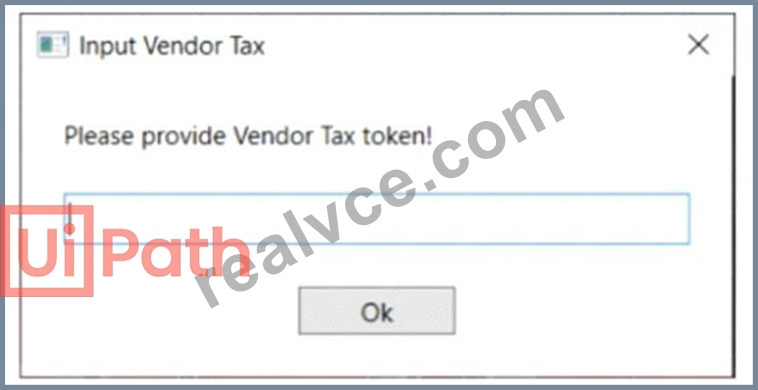
What testing concept (included in UiPath.Testing.Activities) can be used to isolate and replace the input part, without modifying the original workflow?
- A. RPA Testing
- B. Data-Driven Testing
- C. Application Testing
- D. Mock Testing
Answer: D
Explanation:
Mock Testing is a concept that allows you to isolate and replace the input part of an attended RPA process, without modifying the original workflow. Mock Testing enables you to create a mock file of your workflow by selecting Mock workflow under test in the Create Test Case window. This creates a copy of your workflow with the name workflowName_mock and stores it in Project > Mocks. This folder mirrors the source workflow file tree structure. In the mock file, you can use the Surround with mock option to insert a mock activity that replaces the original input activity. For example, instead of asking the user to input a specific token, you can use a mock activity that assigns a predefined token value to a variable. This way, you can test the specific function of the process without having to enter the token manually every time. Mock Testing is useful for tests that have permanent effects in production or require special resources1.
The other options are incorrect because:
Option A is incorrect because Application Testing is not a concept that can be used to isolate and replace the input part of an attended RPA process, without modifying the original workflow. Application Testing is a type of testing that focuses on verifying the functionality, usability, performance, and security of an application2.
Option B is incorrect because Data-Driven Testing is not a concept that can be used to isolate and replace the input part of an attended RPA process, without modifying the original workflow. Data-Driven Testing is a type of testing that uses external data sources, such as Excel files or databases, to provide input values and expected results for the test cases3.
Option D is incorrect because RPA Testing is not a concept that can be used to isolate and replace the input part of an attended RPA process, without modifying the original workflow. RPA Testing is a type of testing that involves using robots to automate the testing of other robots or applications.
References:
Studio - Mock Testing - UiPath Documentation Portal
Application Testing - UiPath Documentation Portal
Data-Driven Testing - UiPath Documentation Portal
[RPA Testing - UiPath Documentation Portal]
NEW QUESTION # 120
What is the purpose of the Invoke Code activity in UiPath?
- A. Invokes VB MET or Java code optionally passing it a list of input arguments
- B. Invokes VB.NET or C# code, optionally passing il a list of input arguments.
- C. Invokes Java code, optionally passing it a list of input arguments.
- D. Invokes VB MET code optionally passing it a list of input arguments
Answer: B
NEW QUESTION # 121
Considering that the attached table is stored in a variable called "dt":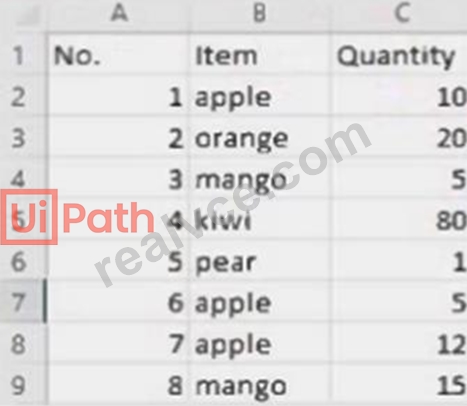
Which LINQ query can be used to return the maximum total Quantity?
- A. dt.AsEnumerable. OrderByDescending(Function(x) Convert.ToInt32(x("Quantity").ToString)). First.Item("Quantity")
- B. dt.AsEnumerable. Max(Function(x) Convert.ToInt32(x("Quantity").ToString))
- C. dt.AsEnumerable. GroupBy(Function(x) x("Item").ToString). Max(Function(x) x.Sum(Function(y) Convert.ToInt32(y("Quantity").ToString)))
- D. dt.AsEnumerable. Max(Function(x) Convert.ToInt32(x("Quantity").ToString))("Item")
Answer: C
Explanation:
The LINQ query that can be used to return the maximum total Quantity from the attached table is dt.
AsEnumerable. GroupBy(Function(x) x("Item").ToString). Max(Function(x) x.Sum(Function(y) Convert.
ToInt32(y("Quantity").ToString))). This query uses the LINQ methods AsEnumerable, GroupBy, Max, and Sum to manipulate the data in the dt variable. The dt variable is a DataTable that contains the following data:
No.
Item
Quantity
1
apple
10
2
orange
20
3
mango
50
4
kiwi
80
5
pear
1
6
apple
5
7
mango
15
The AsEnumerable method converts the DataTable into an Enumerable collection of DataRow objects. The GroupBy method groups the elements of the collection by the value of the Item column, creating a collection of groups. Each group has a key, which is the Item name, and a list of elements, which are the DataRows that have the same Item value. The Max method returns the maximum value of the collection, based on a selector function. The selector function is a lambda expression that calculates the sum of the Quantity column for each group. The Sum method returns the sum of the elements in a collection, based on a selector function. The selector function is a lambda expression that converts the value of the Quantity column into an integer.
Therefore, the query will group the DataRows by the Item name, calculate the total Quantity for each group, and return the maximum total Quantity among the groups. The maximum total Quantity is 80, which corresponds to the group with the key "kiwi". References: [DataTable.AsEnumerable Method], [Enumerable.
GroupBy Method], [Enumerable.Max Method], [Enumerable.Sum Method]
NEW QUESTION # 122
Data from an Excel file is read into a data table named "dtEmployee", as displayed in the following graphic: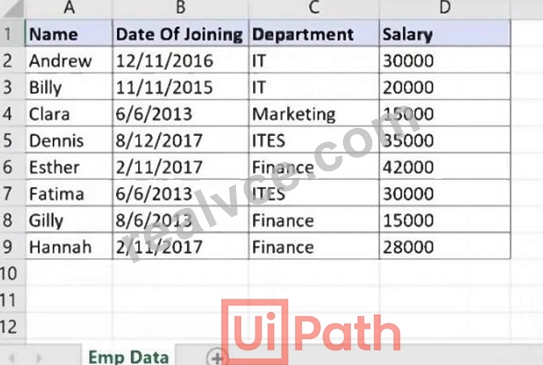
A developer needs to filter the data table to obtain all rows representing employees from the Finance and IT departments with a Salary under 30,000. Which expression yields the desired outcomes?
- A. dtEmployee.Select("([Department]='IT' AND [Department]='Finance') AND [Salary] < 30000")
- B. dtEmployee.Select("[Department]='IT' OR [Department]= 'Finance' AND [Salary] < 30000")
- C. dtEmployee.Select("([Department]='IT' OR [Department]='Finance') AND [Salary] < 30000")
- D. dtEmployee.Select("[Department]='IT OR [Department]='Finance' OR [Salary] < 30000")
Answer: C
NEW QUESTION # 123
In a UiPath coded automation, what does the DelayAsync method do?
- A. It suspends execution asynchronously for a specified period of time.
- B. It adds a pause between the execution of each activity in the automation.
- C. It delays the start of the automation by a specified period of time.
- D. It delays the termination of the automation by a specified period of time.
Answer: A
Explanation:
In UiPath coded workflows (using the SDK for .NET), theDelayAsyncmethod is used tosuspend execution asynchronouslyfor a specified duration. This allows the rest of the application to remain responsive while the delay occurs in a non-blocking fashion.
Reference:UiPath Developer Guide > Coded Workflows > Async Methods
NEW QUESTION # 124
In a UiPath REFramework project, what is the primary purpose of using Custom Log Fields?
- A. To add specific contextual information to log messages that are relevant to the automation process.
- B. To generate extra variables alongside log messages, enhancing workflow understanding.
- C. To modify the representation of logged contextual data as it is displayed in the Orchestrator.
- D. To maintain contextual insights within log messages, including secure details like credentials.
Answer: A
NEW QUESTION # 125
Which are the actions that can be done in Test Explorer?
- A. Export test results, group tests together, analyze activity coverage.
- B. Perform debugging, analyze activity coverage, group tests together.
- C. Export test data, perform debugging, analyze activity coverage.
- D. Export test data, group tests together, analyze activity coverage.
Answer: A
Explanation:
Test Explorer is a panel that shows information relevant to test automation in UiPath Studio. You can use Test Explorer and its sub-panels to perform various actions, such as1:
Export test results: You can export the test results shown in the Test Results panel to a JSON or HTML file, which can be used for further analysis or reporting.
Group tests together: You can group tests together based on different criteria, such as test type, test status, test suite, etc. This helps you organize and filter the tests in the Test Explorer panel.
Analyze activity coverage: You can analyze the activity coverage of your test cases by using the Activity Coverage panel, which shows the percentage of activities that have been executed during the test run. You can also filter the activities by covered or uncovered in the Designer panel.
The other options are not actions that can be done in Test Explorer, because they either involve features that are not part of Test Explorer, or they are not related to test automation. For example:
Option A is incorrect, because Test Explorer does not have a feature to export test data, but only test results. Test data can be generated or managed by using other activities, such as Generate Test Data or Test Data Queue.
Option B is incorrect, because Test Explorer does not have a feature to perform debugging, but only to run or retry tests. Debugging can be done by using the Debug tab in Studio, which allows you to set breakpoints, inspect variables, and step through the workflow.
Option D is incorrect, because Test Explorer does not have a feature to export test data, but only test results. Test data can be generated or managed by using other activities, such as Generate Test Data or Test Data Queue.
References:
1: Studio - Test Explorer - UiPath Documentation Portal
NEW QUESTION # 126
When a developer runs a process using the REFramework, with the process utilizing Orchestrator queues and a queue already created with the Name provided and the Auto Retry function disabled, which states will be executed without errors?
- A. Initialization -> Process Transaction -> End Process
- B. Initialization -> Get Transaction Data -> Process Transaction -> End Process
- C. Initialization -> End Process
- D. Initialization -> Get Transaction Data -> End Process
Answer: B
Explanation:
The states that will be executed without errors when a developer runs a process using the REFramework, with the process utilizing Orchestrator queues and a queue already created with the Name provided and the Auto Retry function disabled, are Initialization, Get Transaction Data, Process Transaction, and End Process. The REFramework is a template that provides a robust and scalable structure for building automation processes.
The REFramework consists of four main states: Initialization, Get Transaction Data, Process Transaction, and End Process. The Initialization state is responsible for initializing the application, reading the configuration file, and logging in to the Orchestrator. The Get Transaction Data state is responsible for fetching the next transaction item from the Orchestrator queue and assigning it to the TransactionItem variable. The Process Transaction state is responsible for executing the main logic of the process for the current transaction item.
The End Process state is responsible for closing the application, logging out of the Orchestrator, and performing any cleanup actions. If the process utilizes Orchestrator queues and a queue already exists with the Name provided and the Auto Retry function disabled, then the process will be able to execute these states without errors, assuming that there are no other issues or exceptions in the workflow. References: [Robotic Enterprise Framework], [REFramework States]
NEW QUESTION # 127
Which logging level includes the following information by default?
1. Execution Started log entry - generated every time a process is started.
2. Execution Ended log entry - generated every time a process is finalized.
3. Transaction Started log entry - generated every time a transaction item is obtained by the robot from Orchestrator.
4. Transaction Ended log entry - generated every time the robot sets the transaction status to either Success or Failed.
5. Activity Information log entry - generated every time an activity is started, faulted or finished inside a workflow.
6. Arguments and Variables Information log entry - show values of the variables and arguments that are used.
- A. Information
- B. Critical
- C. Verbose
- D. Trace
Answer: C
Explanation:
The Verbose logging level includes the following information by default:
* Execution Started log entry - generated every time a process is started.
* Execution Ended log entry - generated every time a process is finalized.
* Transaction Started log entry - generated every time a transaction item is obtained by the robot from Orchestrator.
* Transaction Ended log entry - generated every time the robot sets the transaction status to either Success or Failed.
* Activity Information log entry - generated every time an activity is started, faulted or finished inside a workflow.
* Arguments and Variables Information log entry - show values of the variables and arguments that are used.
The Verbose logging level is the most detailed one and it is useful for debugging purposes, as it provides a lot of information about the execution flow and the data used by the robot. However, it also generates a lot of log entries, which can affect the performance and the storage space of the robot and Orchestrator. References:
[Logging Levels]
NEW QUESTION # 128
A developer has created a string array variable as shown below:
UserNames = {"Jane", "Jack", "Jill", "John"}
Which expression should the developer use in a Log Message activity to print the elements of the array separated by the string ","?
- A. String.Join(", ", UserNames)
- B. String.Join(UserNames, ", ")
- C. String.Concat(",", UserNames)
- D. String.Concat(UserNames,",")
Answer: A
Explanation:
To print the elements of a string array separated by a specific string, the String.Join method is used in C#. This method takes two parameters: the first is the separator string and the second is the array to join into a single string.
Given the options and the requirement to separate array elements with a comma and a space (", "), the correct expression to use in a Log Message activity would be:
C: String.Join(", ", UserNames)
This will produce a single string with each element of the UserNames array separated by ", " (a comma followed by a space).
NEW QUESTION # 129
A project built using REFramework pulls phone numbers from a database of employees and creates queue items for each one. Following processing, these elements must be added to a financing application. The queue item holding a phone number becomes invalid if a digit is accidentally left out because of a human mistake.
As a requirement, queue items that contain partial numbers should not be accepted.
What type of error should be thrown according to best practices?
- A. Application Exception
- B. System Exception
- C. Business Exception
- D. Fatal Exception
Answer: C
Explanation:
The type of error that should be thrown according to best practices for queue items that contain partial numbers is Business Exception. A Business Exception is an exception that occurs due to an incorrect or incomplete input data or an expected business rule violation. A Business Exception indicates that the transaction item cannot be processed successfully and should be marked as failed in the queue. A Business Exception can be thrown by using the Throw activity in UiPath Studio, with the exception type set to UiPath.
Core.BusinessRuleException. Alternatively, a Business Exception can be thrown by using the Set Transaction Status activity in the REFramework, with the status set to Failed and the exception type set to Business Exception. References: [Business Exception vs Application Exception], [Throw], [Set Transaction Status]
NEW QUESTION # 130
A developer plans to build an automation process using the REFramework with Orchestrator queues. Based on UiPath best practice, what is the recommended sequence of steps to update the template and create/update Queues and Values?
Instructions: Drag the Description found on the left and drop on the correct Step Sequence found on the right.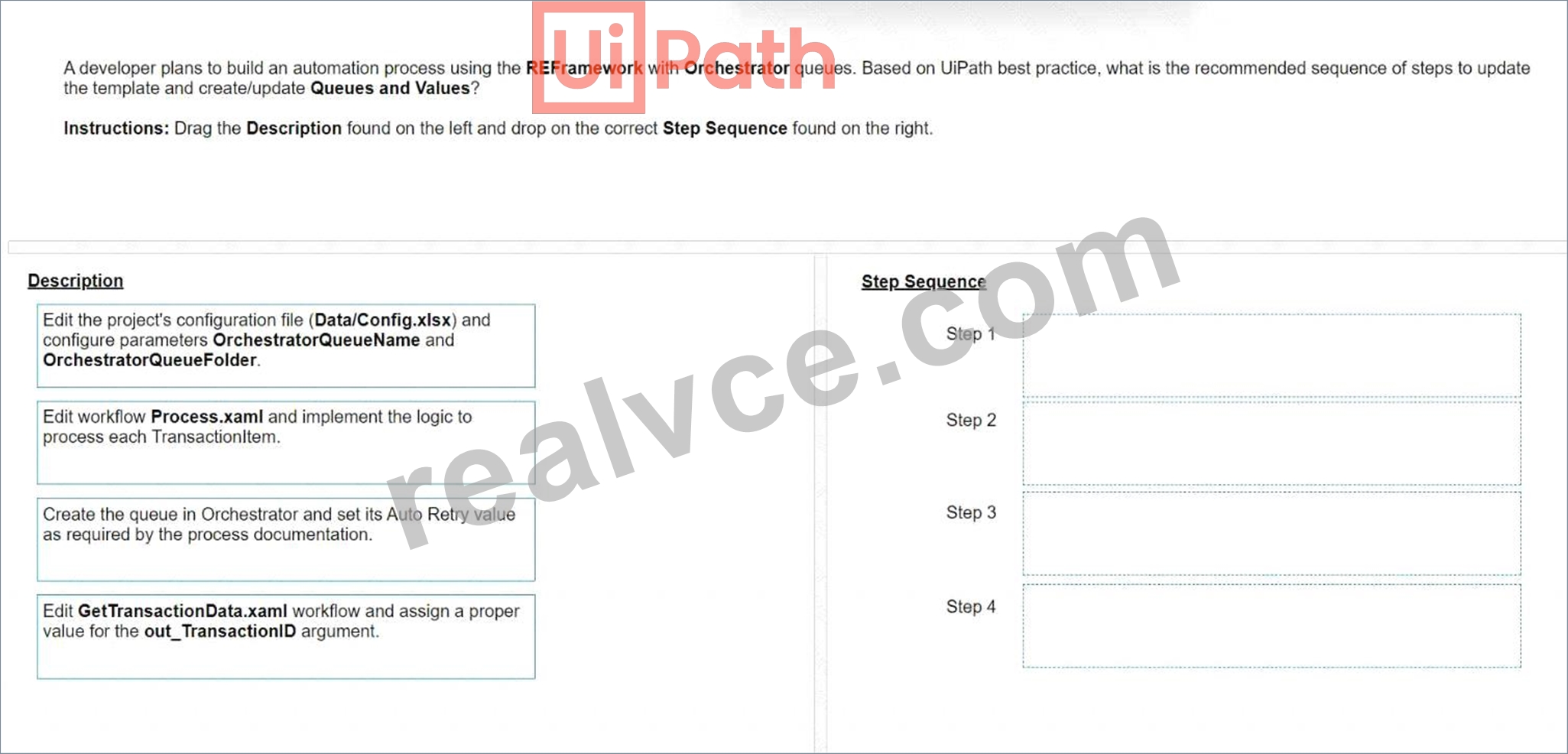
Answer:
Explanation: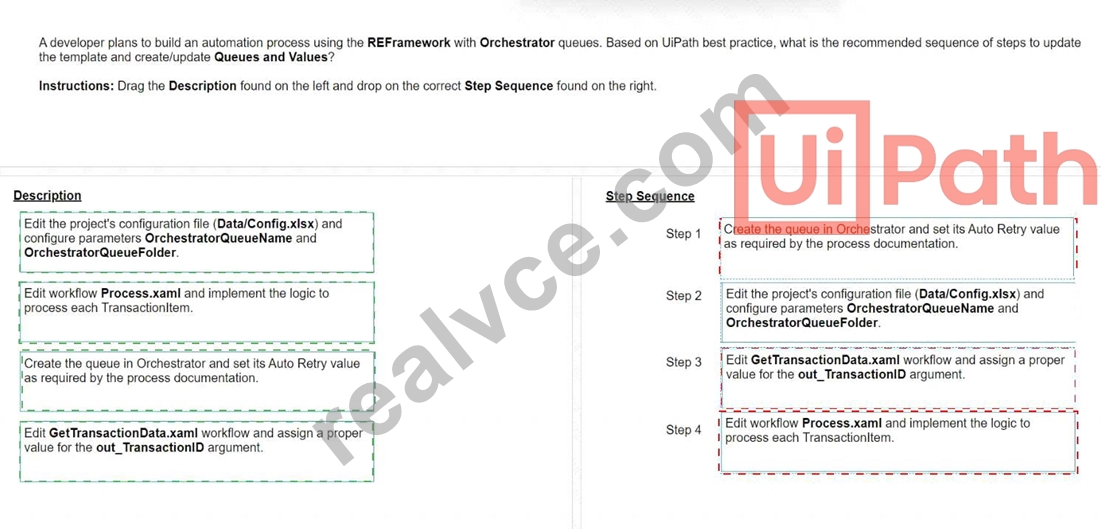
Explanation:
A screenshot of a computer program Description automatically generated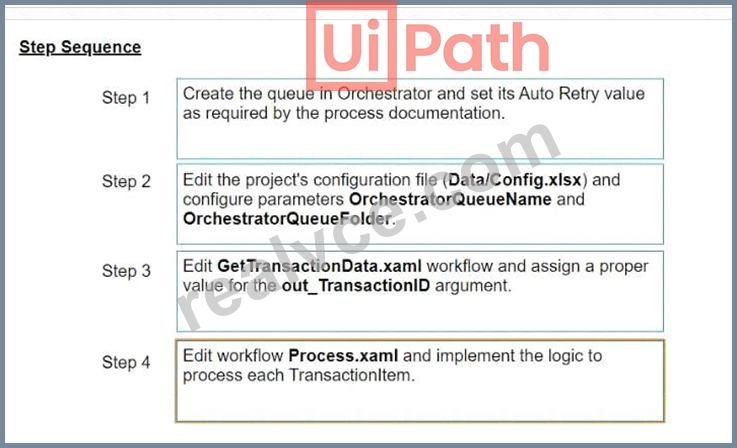
To align with UiPath's best practices when updating the REFramework template for use with Orchestrator queues, the sequence of steps should ensure proper setup of the queues in Orchestrator, configuration of the project to interact with these queues, and implementation of the business logic to process items from the queues.
Here's how the steps should be sequenced:
Step 1: Create the queue in Orchestrator and set its Auto Retry value as required by the process documentation.This step ensures that the queue is available in Orchestrator with the correct settings before the automation attempts to interact with it.
Step 2: Edit the project's configuration file (Data/Config.xlsx) and configure parameters OrchestratorQueueName and OrchestratorQueueFolder.Once the queue is created, the next step is to ensure that the automation project is configured to reference the correct queue and folder within Orchestrator.
Step 3: Edit GetTransactionData.xaml workflow and assign a proper value for the out_TransactionID argument.This configuration allows the workflow to correctly fetch transaction items from the Orchestrator queue for processing.
Step 4: Edit workflow Process.xaml and implement the logic to process each TransactionItem.Finally, the core processing logic that operates on each queue item is implemented, allowing the automation to perform the necessary actions for each transaction.
NEW QUESTION # 131
In the Global Exception Handler, which arguments are provided by default and should not be removed?
- A. errorinfo with the "Out" direction result with the "In/Out" direction
- B. errorinfo with the "In" direction result with the *ln/Ouf direction
- C. errorinfo with the "In" direction result with the "In" direction
- D. errorinfo with the "In" direction result with the "Out" direction
Answer: D
Explanation:
The Global Exception Handler is a type of workflow that determines the project's behavior when encountering an execution error. It has two arguments that are provided by default and should not be removed.
They are:
errorinfo: This argument has the "In" direction and it stores information about the error that was thrown and the workflow that failed. It can be used to log the error details, get the name of the activity that caused the error, or count the number of retries1.
result: This argument has the "Out" direction and it is used to specify the next action of the process when it encounters an error. It can have one of the following values: Continue, Ignore, Retry, or Abort. These values determine whether the exception is re-thrown, ignored, retried, or stops the execution1.
The other options are not correct, because they either have the wrong direction for the arguments, or they use the "In/Out" direction, which is not valid for the Global Exception Handler arguments1.
References:
1: Studio - Global Exception Handler - UiPath Documentation Portal
NEW QUESTION # 132
When developing a process, you were provided with two data tables, "DT1" and "DT2", as shown below: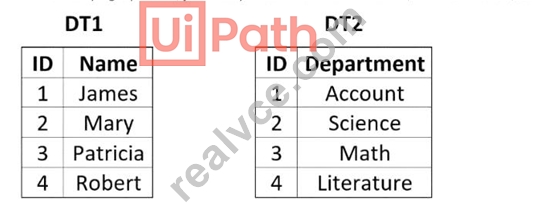
The process documentation specifies that the two data tables need to be manipulated in order to reflect the following "DT2":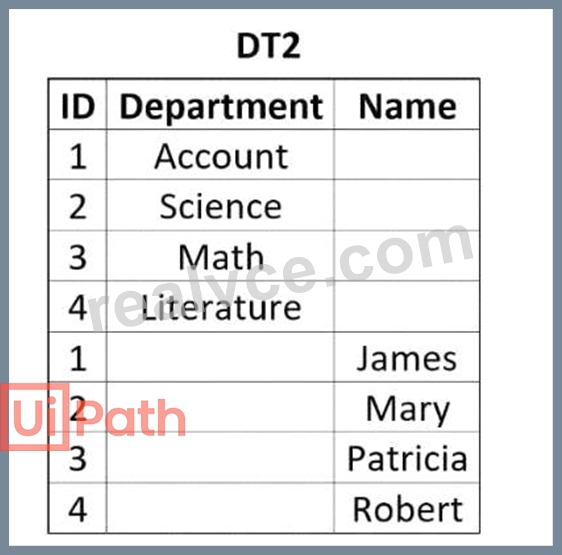
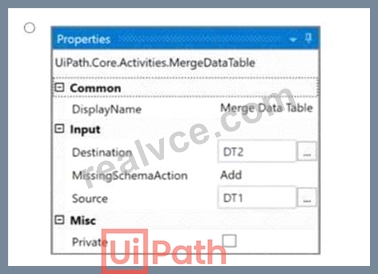
How should the properties of the Merge Data Table activity be configured?
- A.
- B.
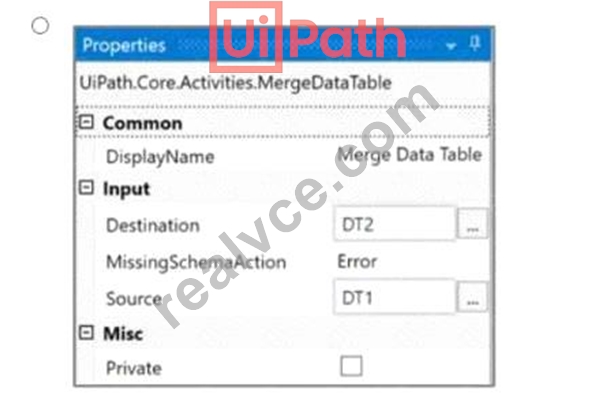
- C.
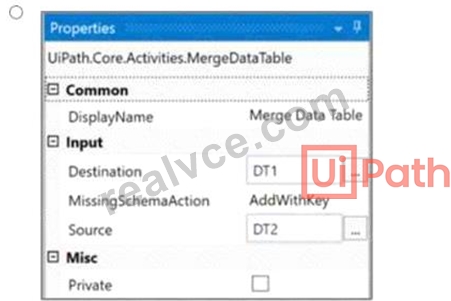
- D.
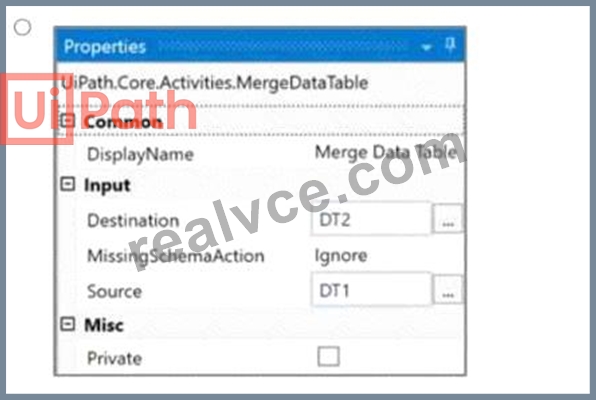
Answer: C
Explanation:
Given the two data tables DT1 and DT2, to achieve the desired result where DT2 contains both the department and the names, the Merge Data Table activity should be configured to merge DT1 into DT2. This configuration requires specifying DT1 as the source table and DT2 as the destination table. The MissingSchemaAction should be set to AddWithKey which ensures that if the source table (DT1) contains columns that are not found in the destination table (DT2), they will be added to the destination table with the primary key information preserved.
Option A shows the correct configuration for the Merge Data Table activity to achieve this result:
Destination: DT1
Source: DT2
MissingSchemaAction: AddWithKey
This setup correctly adds the "Name" column from DT1 to DT2 based on the shared "ID" column, which acts as the key. Since both tables have an "ID" column with matching values, the names will be added to the corresponding IDs in DT2, resulting in a merged table with ID, Department, and Name columns.
NEW QUESTION # 133
How should the computation of the signature be done for client apps that receive Orchestrator requests and need to check their authenticity?
Instructions: Drag the Description found on the left and drop on the correct Step Sequence found on the right.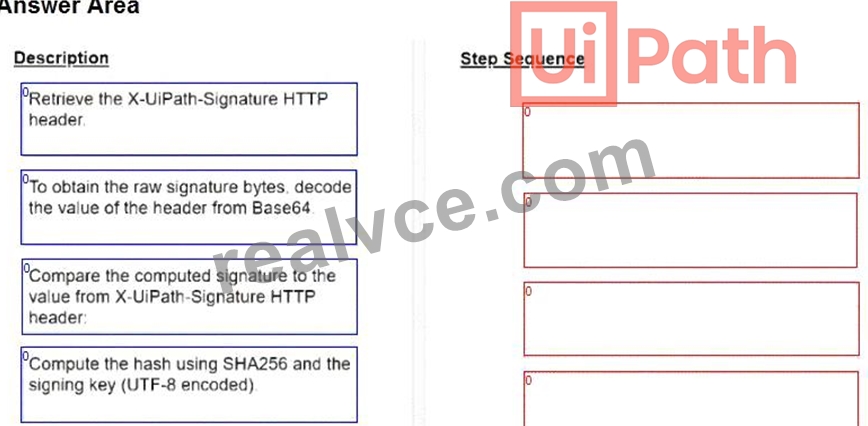
Answer:
Explanation: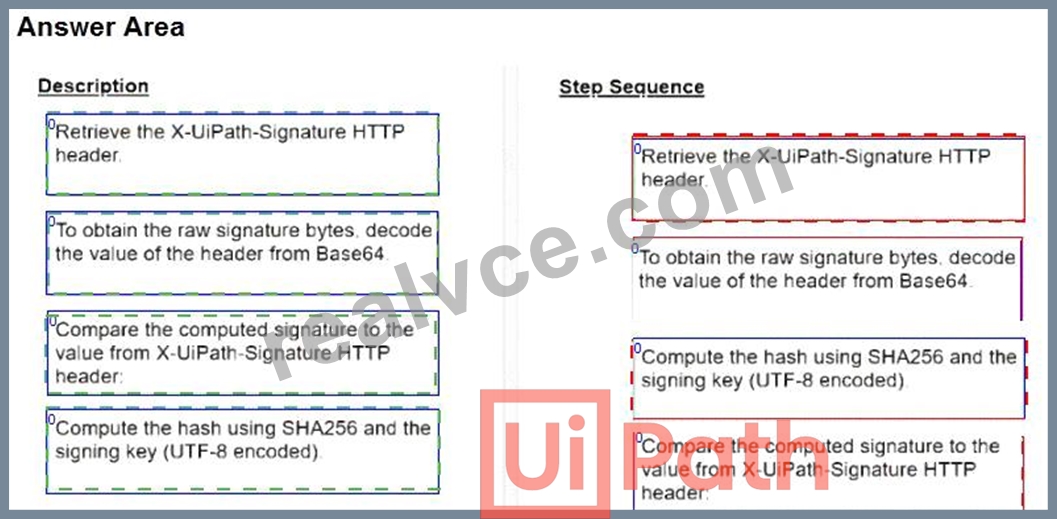
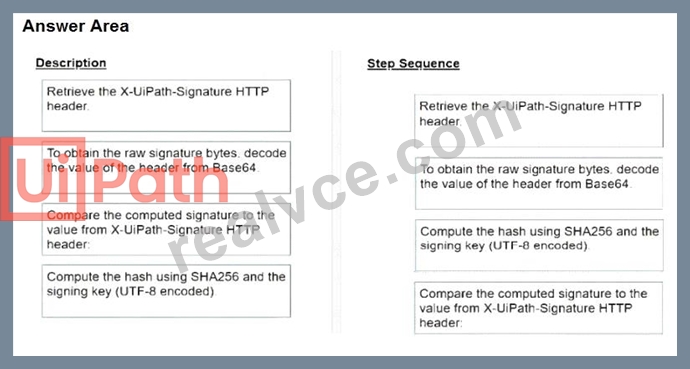
NEW QUESTION # 134
A developer configured the properties for a Click activity as shown below: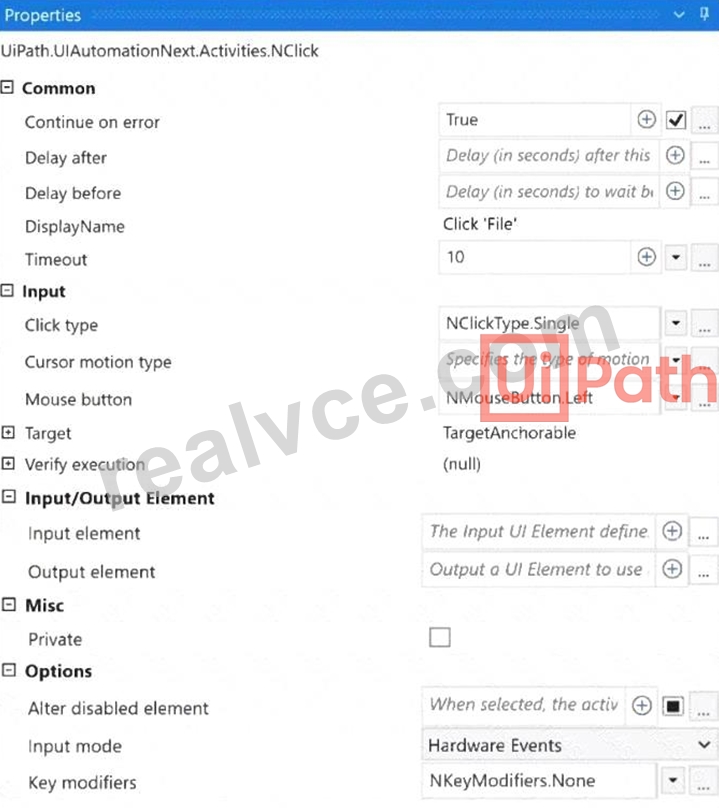
What happens if the activity cannot find its target at runtime?
- A. An exception is thrown after 10 seconds.
- B. The next activity is executed after 10 milliseconds.
- C. The next activity is executed after 10 seconds.
- D. An exception is thrown after 10 milliseconds.
Answer: A
Explanation:
The Click activity has a property called TimeoutMS. This property specifies the amount of time (in milliseconds) to wait for the activity to be executed before an error is thrown. In this case, the TimeoutMS property is set to 10000 milliseconds (10 seconds). Therefore, if the activity cannot find its target at runtime, an exception will be thrown after 10 seconds.
NEW QUESTION # 135
Which command in the UiPath installation folder configures the UIPath.RemoteDebugging.Agent utility on a Windows robot to accept remote debugging requests from Studio?
- A. dotnet ./UiPath.RemoteDebuqqinq.Aqent.dll enable -port -password -verbose
- B. UiPath.RemoteDebuqqinq.Aqent.exe enable -port -username -password -verbose
- C. UiPath-RemoteDebuqqinq.Aqent.exe enable -port -password -verbose
- D. UiPath.RemoteDebuqqinq.Aqent.exe start -port -password -verbose
Answer: C
NEW QUESTION # 136
......
Pass Your UiPath Exam with UiPath-ADPv1 Exam Dumps: https://examcollection.realvce.com/UiPath-ADPv1-original-questions.html